Is your care home website costing you enquiries?

Written by Len Burgess, Founder
Len Burgess is the founder of TRG Digital, a specialist digital agency for the UK care sector. He has worked in SEO and digital marketing for over a decade and writes about search, ranking factors and lead generation through a data-first lens: read the data, apply best practice and logic, test, and repeat until you rank.
Connect on LinkedIn
Yes, in most cases it is. The reason is simple: nobody has ever looked at it properly. The chances are the website was built a few years ago by a generic web development company that doesn't understand the nuances of the care sector - does this sound familiar?
The faults that cost care providers enquiries are not the ones a scanner or a web developer flags. They are the ones a worried family, a screen reader and Google each hit in turn.
Most providers have been told their site is fine by whoever built it, and that reassurance is doing the damage.
So keep reading to get our thoughts and ideas on your website and how to make it generate more online enquiries for you.
Why does "your website is fine" cost care homes the most money?
The reassurance usually comes from the person who built the site, so it is a verdict on their own work, not on whether families can use it. A builder who has just handed over a website has every reason to call it fine.
A family trying to find fees at 9pm from a hospital ward has a different standard, and they are the people that really matter.
"Fine" hides specific, checkable faults. A page with no heading. Images with no alt text. A form that sends to an inbox nobody reads (we see this all the time).
None of these produces an error message. They produce silence, and silence is very expensive, especially for care companies who take in social service residents at 80% of the weekly fee; this adds up.
The cost is invisible because it shows up as enquiries that never arrive. A care home can trace local authority placements easily. The council rings, a bed is filled. Private enquiries feel more like luck. According to carehome.co.uk, 16,355 UK care homes and nursing homes are listed on its directory, which means every home is competing for attention from families who have never heard of it.
Most self-funding families now start with a search on Google. If the site does not answer their questions, they move on. The fix is diagnosis first: a list of facts you can act on, not a rebuild.
What does Google actually see when it looks at your care home website?
Google sees pages nothing links to, so they sit in the index and never get found. A care home website often accumulates orphan pages over years of edits, new services and old campaigns. The pages exist, but no route leads to them.
Missing or duplicated headings, thin location pages and no clear structure for "care homes near me" or "dementia care in [town]" searches are common. Google reads headings to understand what a page is about. When headings are missing or repeated, the page looks less relevant than it should.
Google Business Profile details that contradict the site weaken both. A different phone number, an old address or a mismatched postcode tells Google the information is unreliable. The CQC publishes inspection reports and ratings for residential care homes and nursing homes in England, and families often cross-check a home's site against that record.
CQC rating markup done wrong is a recurring fault. A CQC rating should be marked up as an award, never as review stars. Marking it as review stars misrepresents what the rating is and confuses the search result.
Slow pages and expired certificates on subdomains, including the careers subdomain nobody checks, also count against the site. Google notices both, and so do visitors.
Work with TRG
Struggling to fill your beds?
See how we turn local searches into pre-qualified enquiries, delivered straight to your home.
What does a screen reader find on a nursing home website?
A screen reader finds moving carousels, low-contrast text and unlabelled buttons that lock out visitors with sight or motor impairments. These are not rare edge cases. They are standard features on many care home websites, and they make the site unusable for a significant group of people.
The Equality Act duty applies to service providers, and accessibility is a legal question before it is a marketing one. A website that a screen reader cannot navigate is a service that some people cannot access. That is a compliance issue, not a design preference.
Alt text on images is the audit detail that shows whether anyone has genuinely looked at the site. Thirty-four images without alt text is not a technicality. It means a screen reader announces nothing where a photo of a room, a garden or a team should be described; remember, even people with limited sight (quite a few older people) still use the internet and browse websites.
Accessible forms, readable fee information and a phone number that works with a screen reader are the basics. Families with an accessibility need are a private pay audience most homes never reach, because the site quietly turns them away before they can enquire.

An example of one of our clients' websites with the accessibility features and custom 'listen to page' which doesn't just read the text on the page, a custom passage in the backend of the site.
What does a worried family see at 9pm on a phone?
Families search from a hospital ward, on a phone, often late, and form a shortlist in minutes. The CQC find a care home page exists precisely because families start with a search, not with a directory in hand.
A website that loads slowly or hides its phone number is off the shortlist before the family has finished reading.
Fees and funding answers that are missing, buried or written in a way nobody can act on are the biggest single leak. A family asking "what does it cost" wants a number, a range or a clear explanation of how funding works. A page that says "fees vary" and stops there sends them back to the search results and doesn't make the short list.
No availability signal, no clear next step and a contact form that asks for too much too soon all cost enquiries. The questions families actually ask are practical: what does it cost, who pays, can we visit, what happens next.
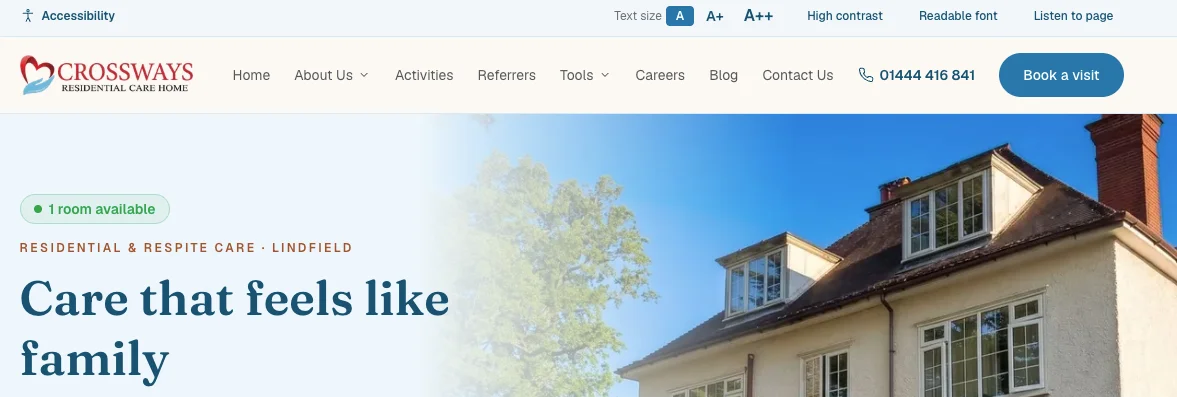
All our clients have a live room availability widget integrated into their site, providing families who are searching with an immediate point of reference for rooms available.
A listing alone will not fill beds. A directory entry can show a home exists, but the website has to answer the questions a listing cannot. That is the job the site exists to do.
Which leaks cost you carers as well as residents?
Vacancies hosted on someone else's job board mean the traffic and the application go elsewhere. The care home pays to attract a candidate, then sends that candidate to a third-party site to apply. The home loses the relationship at the exact moment it matters.
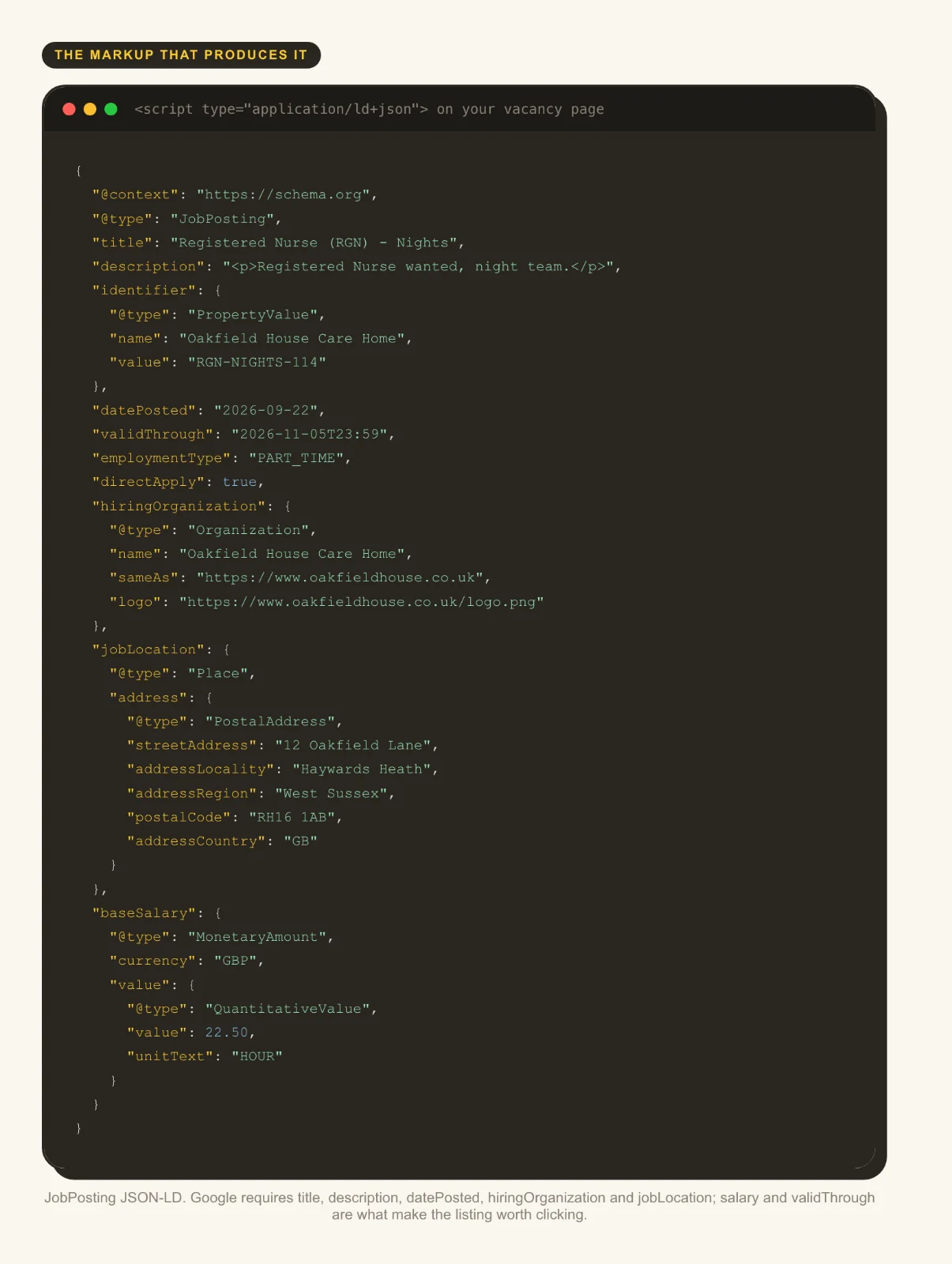
Missing JobPosting markup keeps roles out of the job search results carers actually use. Structured data tells Google a page contains a job, with its title, location and salary. Without it, the vacancy is just another page competing with every other page on the internet.
A broken or expired careers subdomain is a fault a scanner will not find and a candidate will. The main site works, the careers subdomain expired six months ago, and nobody noticed because nobody checks it. Every applicant who hits that dead end is a lost carer.
Applications landing in an inbox nobody monitors, with no confirmation to the applicant, finish the job. Recruitment leaks hit occupancy twice: empty rotas mean closed beds, and closed beds mean lost revenue.
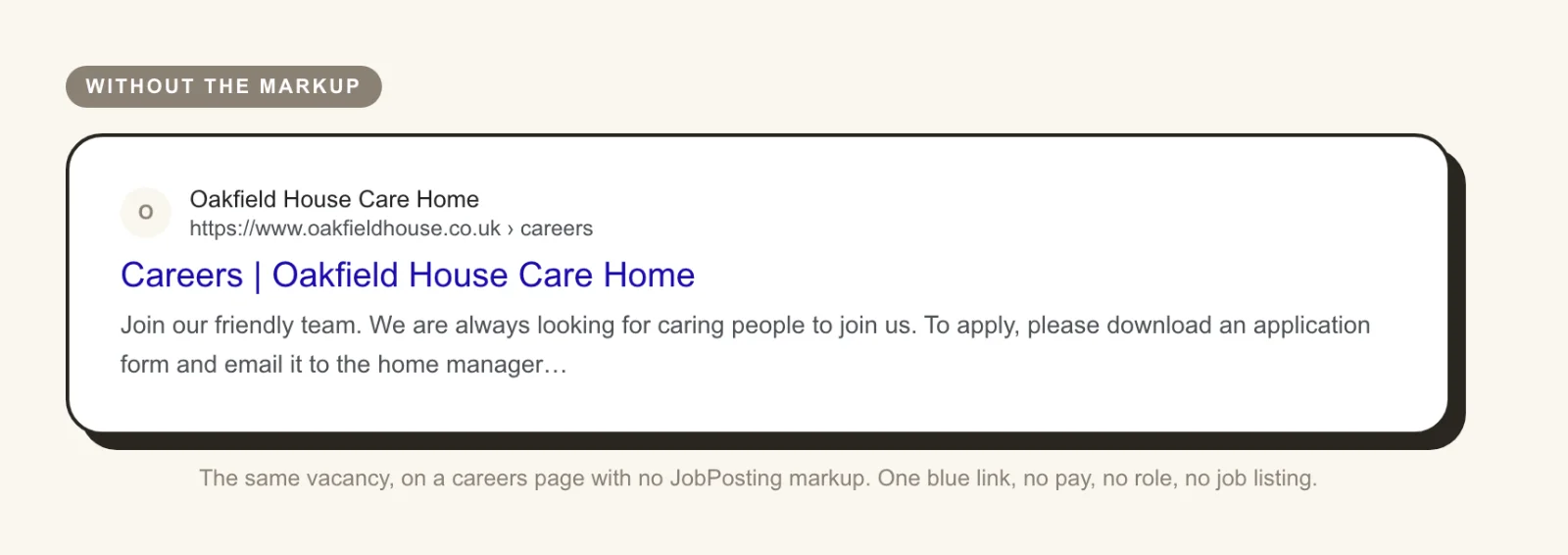
See below for three images that outline the difference in what Google shows with a JobPosting schema and without a JobPosting schema.
Work with TRG
Want more private enquiries?
We put your home in front of the families actively searching for care near you.
The above image is an illustration of what a SERP result looks like without JobPosting schema.
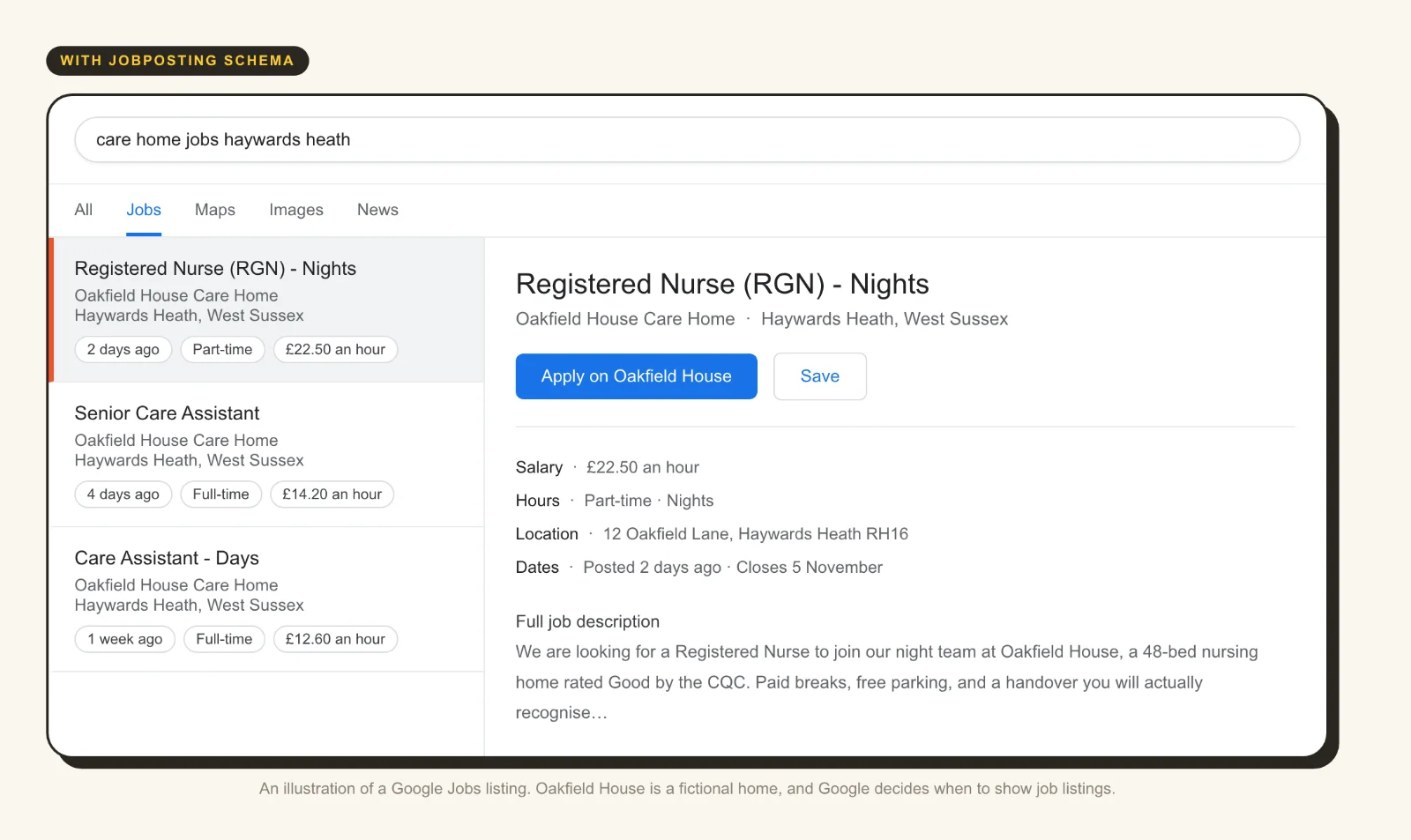
The above image shows what can be achieved with a JobPosting schema markup on the right page. And the image below is an illustration of what the markup looks like, as this is what Google reads.
How does TRG Digital audit a care home website?
TRG Digital's Site Audit goes through your website the way Google, a screen reader and a worried family all see it, then sends a written report: what is wrong, what it is costing you, and what we would fix first.
The audit runs 64 checks across 9 areas, and not one of them is a sales pitch. It looks for the faults that cost enquiries: pages with no headings, images with no alt text, forms that send to unread inboxes, expired certificates and CQC markup done wrong.
The report is yours. Fix it yourself, hand it to whoever built your site, or ask us to do the work. There is no obligation either way, and nothing in it is a sales pitch.
Findings are written in language you can act on, not a score out of 100. A score tells you nothing. A list that says "this form sends to an inbox nobody reads" tells you exactly what to fix.
Where the audit leads is to care home websites built for how families actually choose care, local SEO so you are found by families in your catchment, and paid campaigns measured on enquiries rather than clicks.
How often should a care provider check its own website?
Quarterly is enough for most homes. Check the form, the phone number, the fees page and the careers page. Four checks, four times a year, catch most of the faults that cost enquiries.
Test on a phone, with the sound off, on a slow connection, the way a family in a hospital corridor will. If the site works in those conditions, it works for the people who matter most.
Send a test enquiry and see where it lands, and how long a reply takes. An enquiry that sits in an inbox for three days is an enquiry that has already gone to another home.
Recheck after any CQC inspection, fee change, new manager or website edit. Each of those events can introduce a new fault, and the fault will sit there until someone looks.
Keep the audit report and work down it in order, rather than rebuilding the site every two years. A rebuild resets everything and fixes nothing unless the underlying faults are understood first.
Key Takeaways
Most care providers have been told their website is fine by the person who built it, which is why the faults survive.
The expensive problems are the ones a scanner cannot see: an expired certificate on the careers subdomain, fees nobody can locate, a form sending to an unread inbox.
Nearly every self-funding family starts with a search on Google, often late at night and often from a hospital ward.
CQC ratings should be marked up as an award, never as review stars.
A directory listing alone will not fill beds; the website has to answer the questions families actually ask.
Recruitment leaks cost occupancy twice, because empty rotas mean closed beds.
TRG Digital's Site Audit runs 64 checks across 9 areas and hands over a written report with no obligation.
Conclusion
Most care home websites are not losing enquiries because they look dated. They are losing them because of faults nobody has checked: a fees page families cannot find, a form that sends to an unread inbox, a careers subdomain with an expired certificate, a CQC rating marked up the wrong way.
TRG Digital's Site Audit finds those faults. It runs 64+ checks across 9 areas and looks at your website the way Google, a screen reader and a worried family each see it. You get a written report that says what is wrong, what it is costing you and what to fix first.
The report is yours. Fix the faults yourself, give the report to whoever built your site, or ask us to do the work. Where it helps, we can also build care home websites around how families choose care, run local SEO for your catchment, and manage paid campaigns measured on enquiries rather than clicks. It starts with an honest look at the site you already have.
If you are interested in a site audit, contact us by using the button below.